Renovation Planner · how it works, part 2 of 6
How the renovation planner works · Part 2 — Ideas you love: pin the kitchens you want, then design toward them
Before you choose a single cabinet, collect the kitchens you love, on a board everyone planning with you can see.
About this video
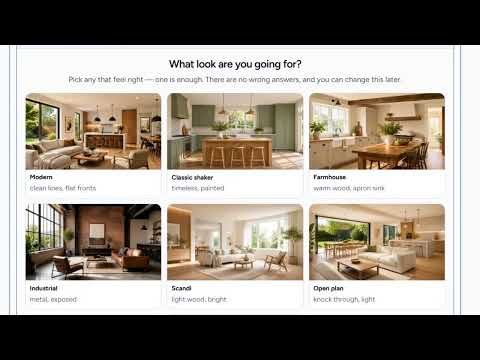
Before you choose a single cabinet, collect what you love: that is what the idea board is for. Open Vibe for pictures to start from, and pick any look that feels right; there are no wrong answers. Classic shaker, painted doors that never date, goes on the board, and so does an island with stools, where everyone ends up. Your picks sit on the board where everyone planning with you can see them. And a tip: save kitchens you would actually cook in, not just admire, and notice where the sink sits and how much counter there is beside the range.
What you’ll see
- Vibe: pictures of kitchens to start from
- Classic shaker cabinets pinned to the board
- An island with stools added beside them
- The board everyone planning with you can see
- What to look for in a kitchen photo: the sink, and the counter beside the range
How the Renovation Planner works
All videos- Part 1: Your first plan: a few answers, and it’s priced for your town1:37
- Part 2: Ideas you love: pin the kitchens you want, then design toward themWatching now0:49
- Part 3: See it in 3D: a kitchen to play with, priced as you draw1:03
- Part 4: Make it yours: cabinets, counters and light1:27
- Part 5: A designer’s eye: what they’d change, and where0:45
- Part 6: Budget, timeline and help: the whole job, priced for your town1:05